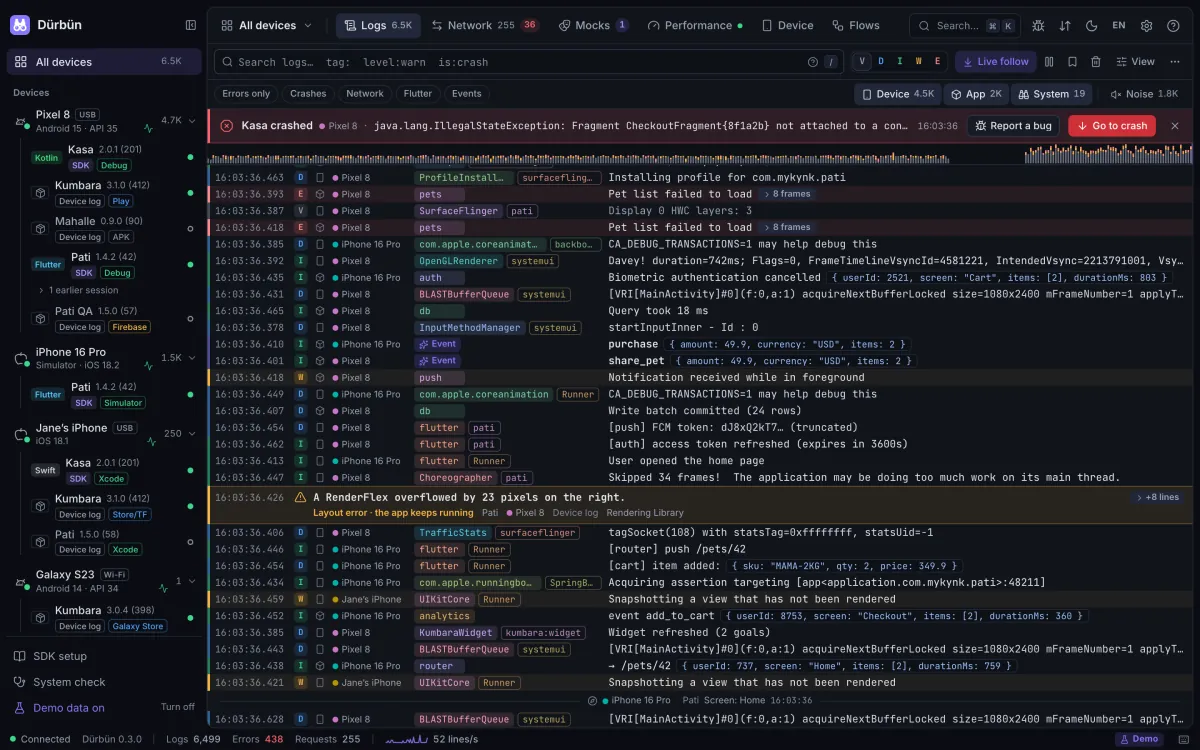
For Android and iOS developers and testers. Plug in a device or start a simulator, and Dürbün shows your app’s logs, network traffic and performance in one readable window.
14:20:21.747EPixel 8AndroidRuntimejava.lang.IllegalStateException: Fragment CheckoutFragment{8f1a2b} not attached to a context. › 7 framesCrash · Kasa · Pixel 8 · thread main
A live demo with simulated devices, right here. Search the logs (try level:warn), open a request, switch a mock on and watch the traffic change.
Starts without an SDK
Device logs come straight from adb, simctl and the iOS device log, and so do the system’s crash reports: iOS .ips files, Android tombstones and ANRs, and apps the system closed for memory. Flutter debug apps attach on their own through the Dart VM Service.
Every device in one window
Phones, tablets, simulators and emulators, Android and iOS, side by side. Pick one to focus, or follow them all.
Made to be read
Stack traces, multi-line output and JSON fold, repeated lines collapse into ×N, and a crash never scrolls past unseen.
Mocks without a proxy
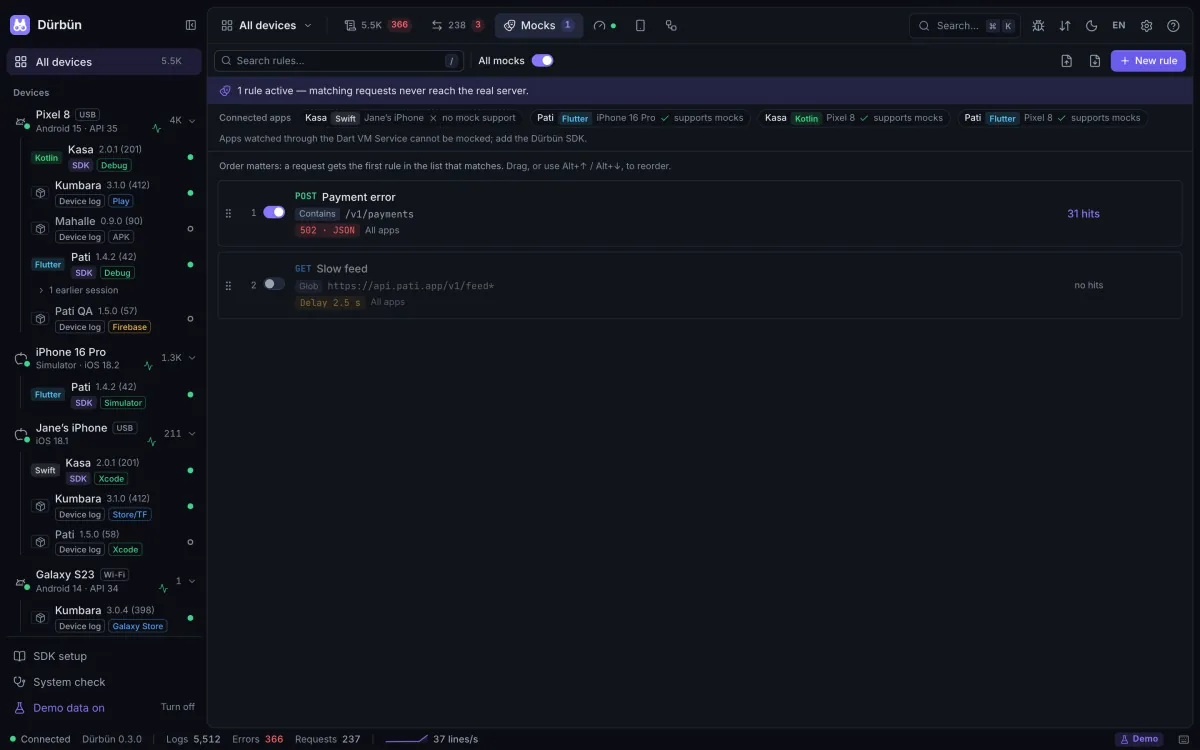
The SDK answers matching requests inside the app: no proxy to run, no certificate to trust, no Wi-Fi settings to change.
Tour
Six views, one window.
Real screenshots of Dürbün with its demo data. Pick a number to look through the binoculars.
Every log line, from every source
Android logcat, the iOS device and simulator logs, your app’s own logs, errors, crashes and events in one live stream. Narrow it to the seconds around a moment.
1
2
3
4
5
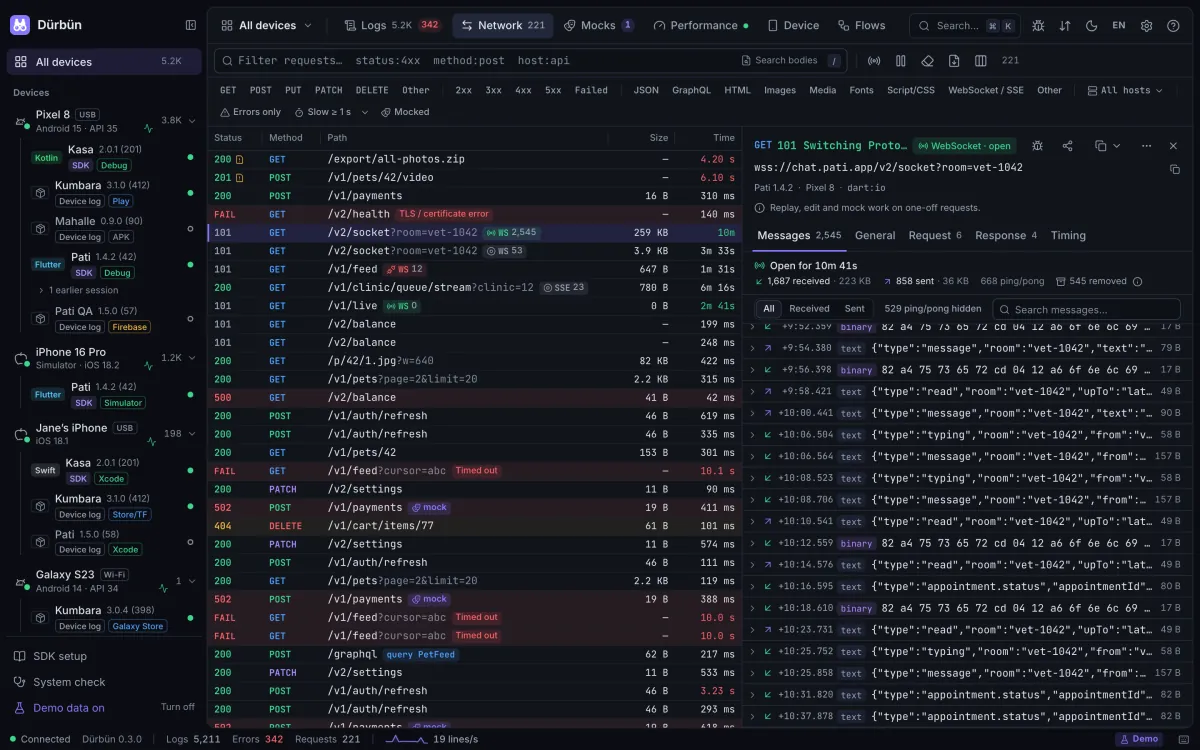
Every request, every message
Every HTTP(S) request with headers, bodies and timings, from the SDK inside the app: copy it as cURL, resend it, compare two, export HAR. WebSocket and Server-Sent Events connections keep their messages. JWTs are decoded on your Mac.
1
2
3
4
5
Test the states that are hard to reach
Answer matching requests with a canned response, add latency or simulate a failure. A rule can target one GraphQL operation. The SDK applies the rules inside the app.
1
2
3
4
5
How the app feels, in numbers
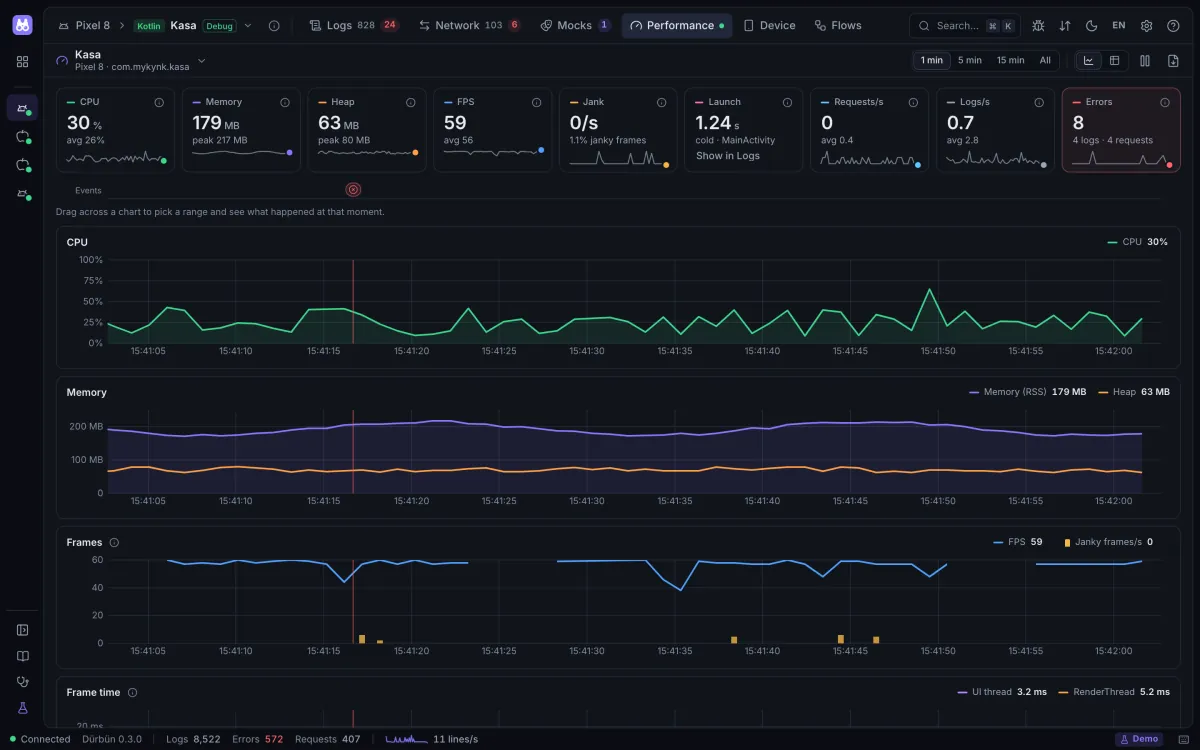
CPU, memory, heap, FPS and jank, frame times, the cold start time, requests and logs per second, live. Drag across a chart to see the logs and requests of that moment.
1
2
3
4
5
The device at your fingertips
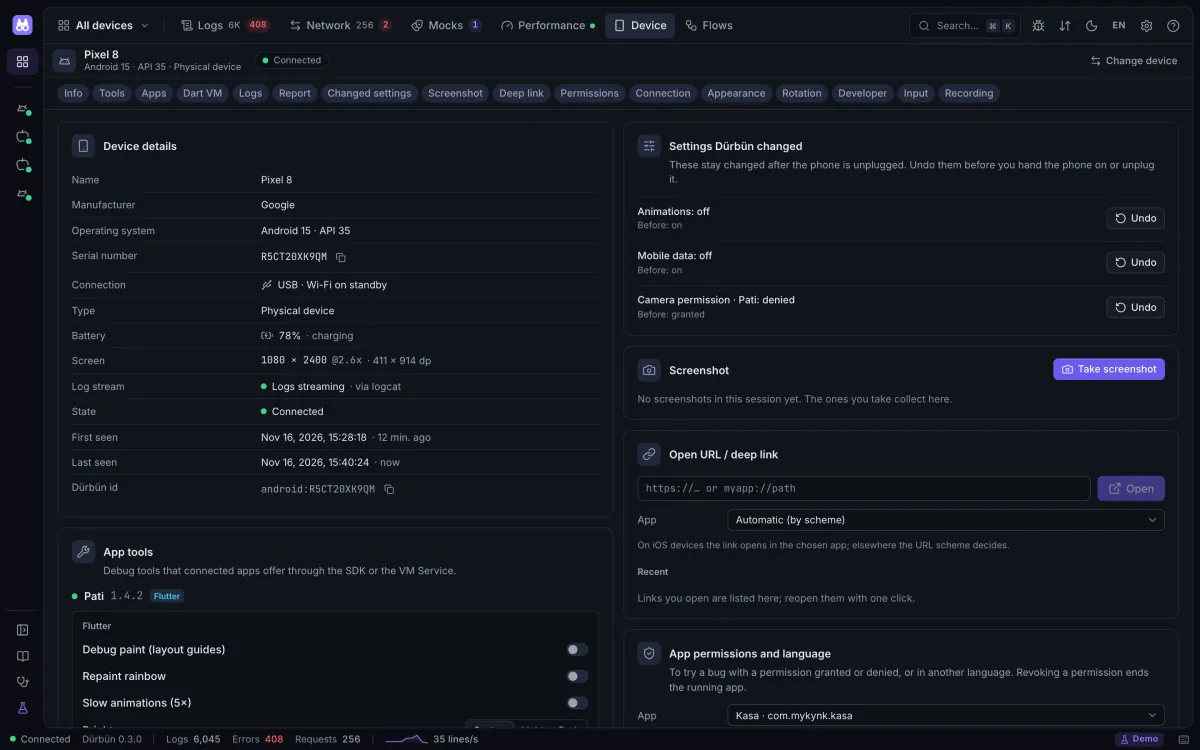
Screenshots and screen recording, deep links, apps, permissions and app language, dark mode, font size, airplane mode, Wi‑Fi, location, simulator push notifications, status bar overrides and buttons your app adds itself. Dürbün lists what it changed and puts it back.
1
2
3
4
5
End-to-end tests you can see
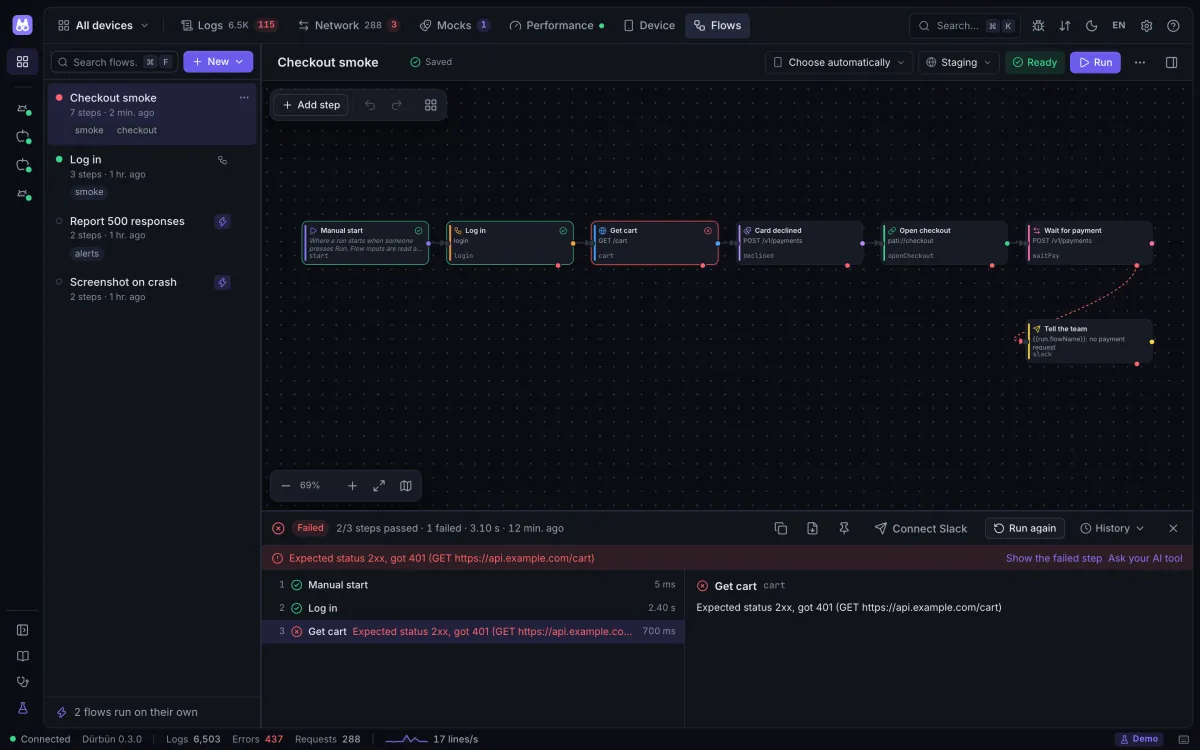
Draw a journey as a graph, run it against a device and an environment, and read every step’s request, response and timing.
1
2
3
4
5
New in 0.3 · For testers
Found a bug? Hand over the whole moment.
Dürbün gathers what happened around the bug, sets the phone up for the next try and puts it back afterwards.
Report a bug
One dialog, from the crash banner, a log line, a request, ⌘K or the top bar. It collects the app’s log lines and failed requests from that time window, a fresh screenshot and the device and app facts, next to your note, and shows the counts before anything leaves the Mac.
Copy it as Markdown, save one .zip (report, logs, a HAR file, the screenshot and a Dürbün recording), or send the text to Slack.
Secret values are masked by default, in log lines too. The screenshot shows whatever was on the screen.
The recording in the .zip opens in Dürbün on any Mac, so the developer sees the same moment.
Report a bugMoment: 14:02:31.480 · request
What goes in
212 log lines
3 failed requests
The moment’s request
Device and app facts
Screenshot
in the .zip only
Dürbün recording of the window
in the .zip only
What happened?
Tapped Pay, the spinner never stopped and no order was created.
Secret values masked
Send to SlackCopy MarkdownSave .zip
Device
Set the phone up for the test
App permissions and language, airplane mode, Wi‑Fi, mobile data, orientation and “Don’t keep activities”. Dürbün lists each change with the value before; Undo puts it back.
Flows
Repeat it in a flow
The same settings are flow steps. Each goes back when the run ends, so the next run starts from the phone you had.
Logs
Only the lines that matter
Show the lines around a moment, from ±10 s to ±5 min, or a span you drag on the histogram. Select several lines and copy or share just those, with passwords, tokens and keys masked.
JWT
Tokens you can read
JWTs in headers, cookies and query values are decoded on your Mac: the claims, the header and whether the token was still valid when the request went out.
Flows
Test the whole journey, not one request.
Sign in, search, add to the cart, check the total: draw it once as a graph and run it with one click, against the device, app and environment you pick. Dürbün sends the requests from your Mac and watches what the app does.
1
Draw it
HTTP requests, conditions, repeats, variables and checks, waits on a request, a log line or an event, mock rules for one scenario and device steps such as permissions, airplane mode or rotation, on one canvas. Three starter flows show the way.
2
Start from what you captured
Pick requests in Network and Dürbün turns them into a flow: the host becomes an environment variable and one response feeds the next request.
3
Let your own AI write it
Dürbün never calls an AI. “Write with AI” copies a pack for the assistant you already use; paste its answer back and see what is new or changed before anything is saved. A flow that fails can go back to it with what went wrong.
Flows call flowsWrite Sign in once and call it from every flow, with inputs and outputs. Templates like {{login.body.token}} pass one step’s answer to the next.
Staging or productionEnvironments hold base URLs, keys and accounts. Secret values stay on your Mac and are masked in reports.
Every step leaves evidenceResponses, timings, screenshots and recordings stay in the run history. Post the result to Slack.
Runs on its ownA crash, a failing request, a log line or an app connecting can start a flow while Dürbün is open. A bar lists every flow that runs on its own; pause them all with one click.
A flow is one JSON file: keep it in git, review it in a pull request, import it by dropping it on the window. A JSON Schema comes with it, so editors complete and check it.
The flow format
Share and back up
Your setup travels with you.
Everything you set up in Dürbün fits in one file, for a teammate or for your next Mac.
.durbun
Share with your team
Flows with the sub-flows they call, mock rules, environments and settings in one file. Secret values never go in, and opening it shows what is new, what is already there and what differs.
iCloud Drive
Back up on a schedule
Everything Dürbün keeps, by hand or automatically into iCloud Drive, Dropbox or any folder. Secrets go in only encrypted with your passphrase (AES‑256‑GCM).
.durbun.json
Record a session
Every session is saved on this Mac as it happens: after a quit or a crash, reopen the last one, kept apart from live data. Export a session with its logs, requests and metrics, or only the requests as HAR, with secret values masked unless you choose otherwise; the files open in Dürbün on any Mac.
Slack
Send to Slack
A log line, a request, a bug report or a flow’s result goes to your team’s channel in one click, from the Mac or from the phone’s in-app panel.
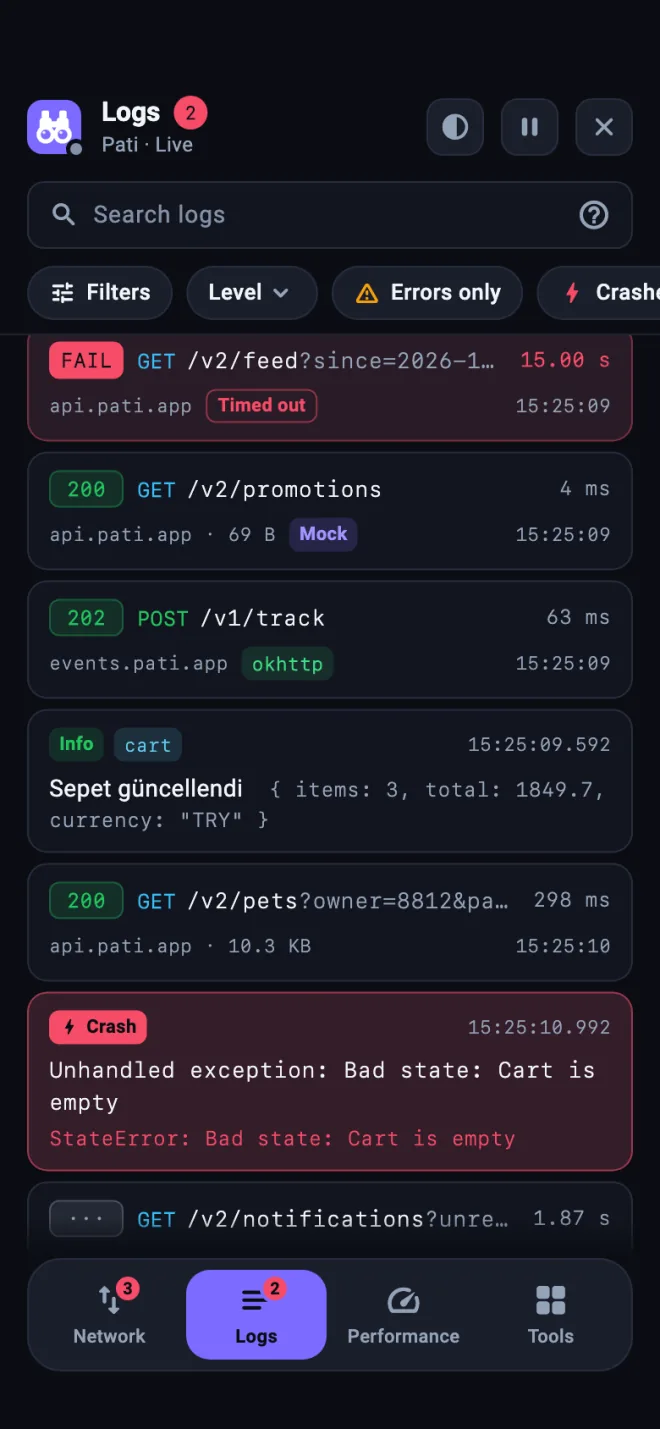
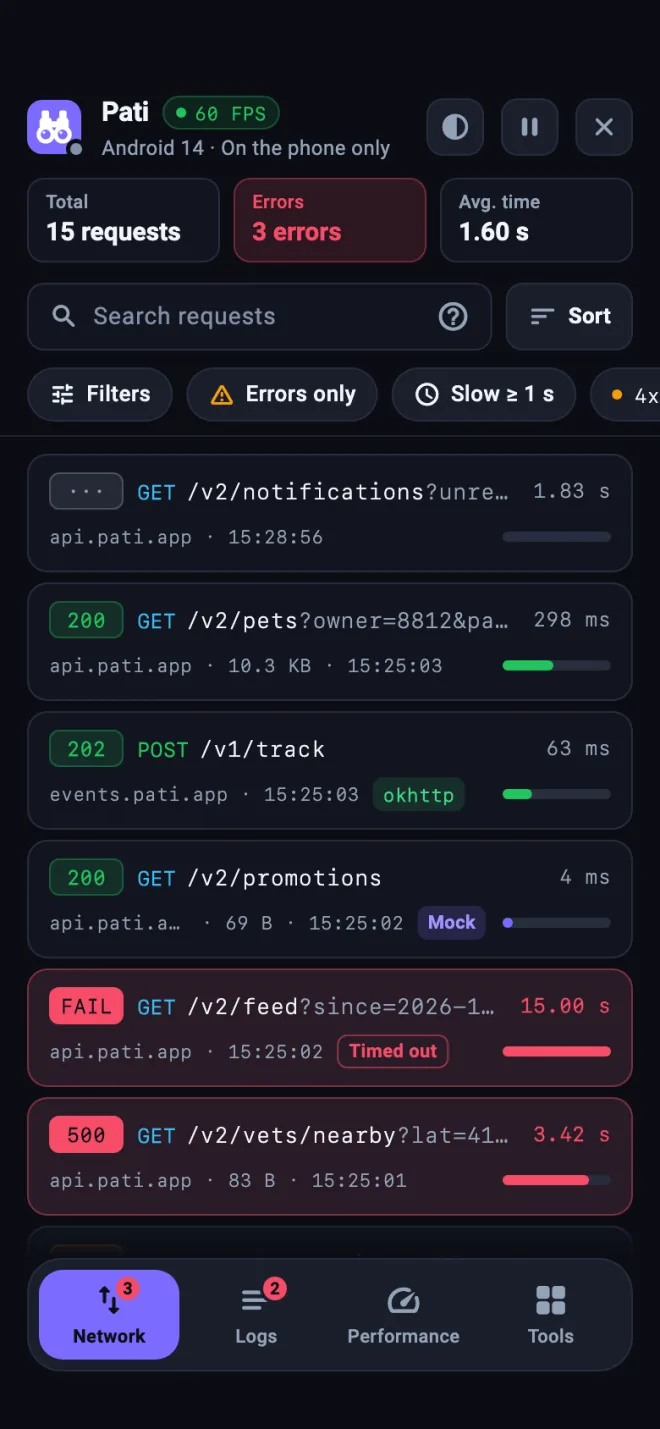
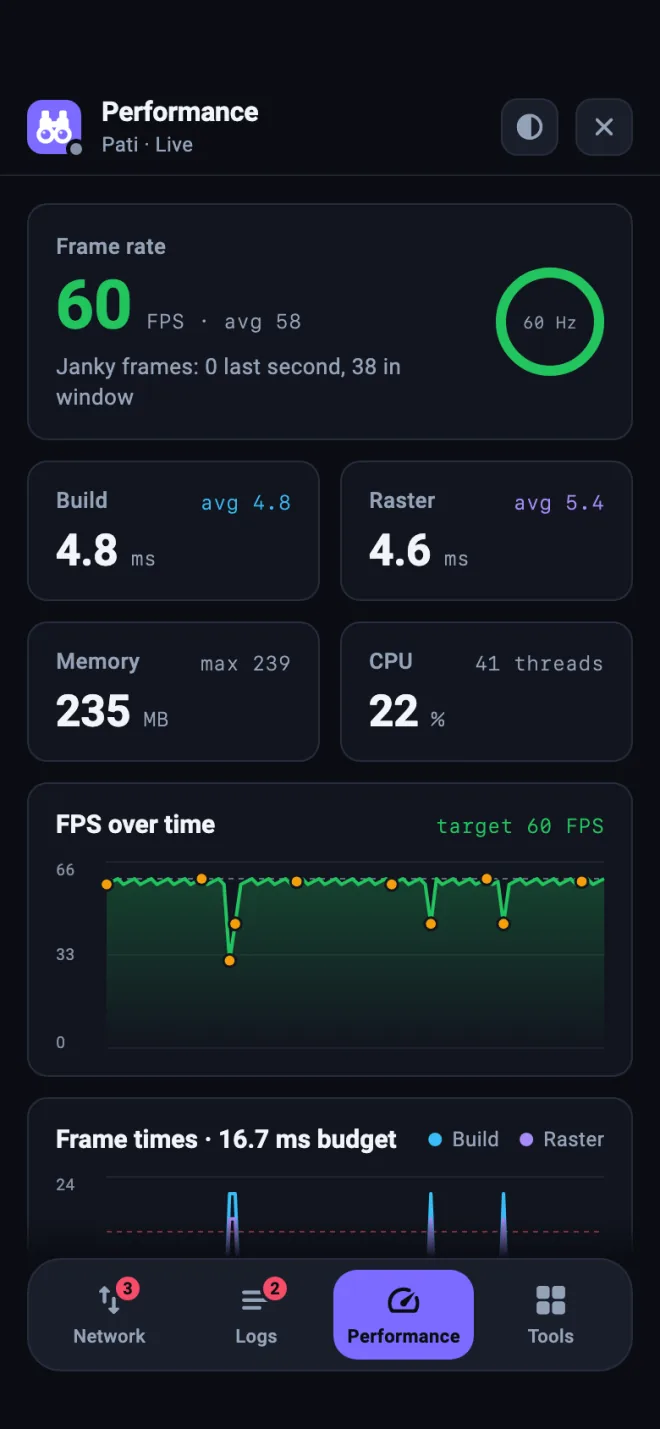
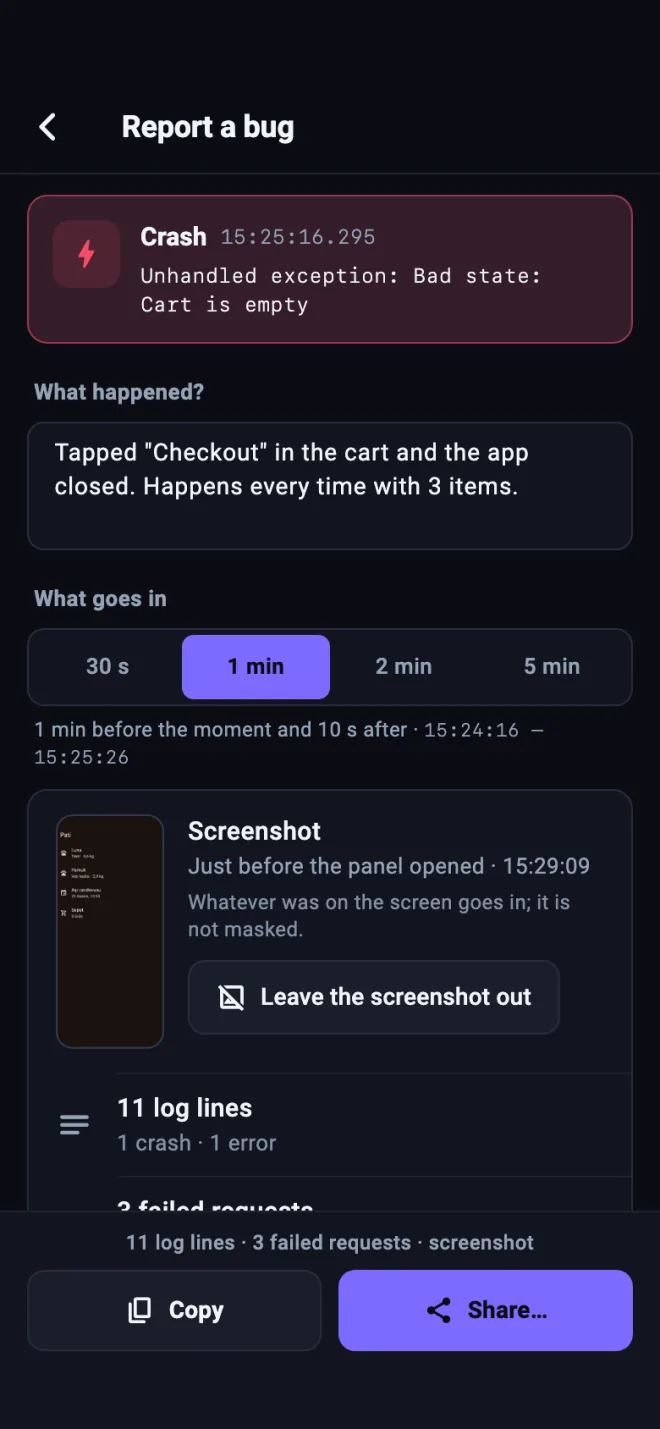
The Flutter package carries a panel inside your app. Shake the phone and read the logs, the requests and the frame times right there, or report a bug from the phone, so a tester can inspect the app on their own phone, with or without a Mac.
Logs
The live stream with levels, quick filters and the desktop’s search language. Requests and events sit in the same stream.
Network
dart:io, package:http, Dio, OkHttp and URLSession as one list of cards, with filters, sorting and search inside bodies. A request opens with headers, a JSON tree, timing, replay and copy as cURL.
Performance
The frame rate against the screen’s refresh rate, then build and raster time, memory and CPU, with FPS and frame time charts.
Report a bug
What just happened, from the phone alone: the log lines and failed requests around a crash, a screenshot from before the panel opened, the device facts and your note, through the share sheet.
No native code to add: the Dart side starts the Android and iOS layers itself. Using Dio with a native adapter? Add durbun_dio too. Debug apps without the SDK still attach through the Dart VM Service.
importDurbun@mainstructMyApp: App {init() {#if DEBUGDurbun.start() // simulator and USB: nothing to configure#endif }varbody: someScene { WindowGroup { ContentView() } }}
URLSession requests are captured. In UIKit the same lines go in application(_:didFinishLaunchingWithOptions:); from Objective-C it is [DURDurbun start]. On CocoaPods it is pod 'Durbun'.
classApp : Application() {overridefunonCreate() {super.onCreate()Durbun.start(this) // nothing else for USB and emulators }}valclient = OkHttpClient.Builder() .addInterceptor(DurbunInterceptor()) .build()
Both artifacts are on Maven Central. Release builds get the no-op artifact: the same API with empty bodies. OkHttp requests are captured through the interceptor. Rather not touch Application? A dev.durbun.autoStart entry in the manifest starts it.
No native code: no pod install and no Gradle changes, so it works in Expo projects too. fetch and XMLHttpRequest are captured. On a physical iPhone the app connects over Wi‑Fi instead of USB: keep the phone and the Mac on the same network, turn on “Allow local network (Wi‑Fi) connections” in Dürbün’s Settings and pass the Mac’s address with Durbun.start({ host: '192.168.1.20' }).
The SDKs are built not to slow down or crash your app: work stays off the main thread, queues are bounded and internal errors are swallowed. They are off in the builds you hand out (release, ad hoc, TestFlight, App Store) unless you turn them on.
What you get, with and without an SDK
Start without one: device logs and crash records need nothing. Add the SDK when you want your app’s own logs, its requests, metrics or mocks.
Your app
Logs
Network
Performance
Mocks
Any app, no SDK
Device logs and system crash records
No
Android process and frame statistics
No
Flutter debug or profile build, no SDK (Dart VM Service)
Adds log() from dart:developer and Flutter errors
dart:io HTTP: package:http, Dio’s default adapter
FPS, jank, Dart heap
No
Flutter with durbun
Adds Durbun.log, debugPrint, crashes and native logs
dart:io HTTP, WebSockets and event streams, plus URLSession on iOS and OkHttp with DurbunInterceptor on Android
FPS, jank, frame times, memory, CPU
Yes
iOS with Durbun
Adds Durbun.log, print and stderr, crashes, and what iOS reports later about earlier launches (MetricKit)
URLSession.shared and your own sessions, Alamofire included; URLSessionWebSocketTask and event streams; fetch and XHR of a WKWebView page with DurbunWebView.attach
CPU, memory, threads, FPS, jank, cold start
Yes
Android with durbun
Adds Durbun.log (Timber too), crashes, and how earlier launches ended (ANRs, native crashes, system kills)
OkHttp clients with DurbunInterceptor: Retrofit, Coil, Ktor’s OkHttp engine; event streams, WebSockets opened through DurbunWebSocketFactory, and fetch and XHR of a WebView page with DurbunWebView.attach
XMLHttpRequest: fetch, axios; the global WebSocket and event streams
JS heap, JS-thread FPS
Yes
What is not captured
Flutter: gRPC and raw sockets, WebSockets that do not run on dart:io, print and HTTP in background isolates you have not attached with Durbun.attachIsolate() (Durbun.log works there), and on Android package:http’s CronetClient and package:ok_http. Dio’s NativeAdapter needs durbun_dio.
iOS: background URLSessions, a WKWebView’s page loads and images, AVPlayer traffic, WebSocket libraries that do not use URLSession.
Android: HttpURLConnection (Volley, Media3’s default data source, Ktor’s CIO engine), Cronet, a WebView’s page loads and images, and native code. gRPC streams show their size only; a WebSocket opened with client.newWebSocket shows its handshake only.
React Native: <Image> downloads, requests made by native modules and WebSocket classes from a package instead of the global WebSocket.
Run the server from the repository with Node.js 20 or later. Nothing to install in Applications.
git clone https://github.com/mykynk/durbun.gitcd durbunnpm installnpm run buildnpm start
The interface opens at http://127.0.0.1:9750.
npm run demo starts it with simulated devices instead. Flags such as --port, --sdk-port, --lan, --data-dir and --no-open change the ports, open it to your network, use a separate data folder or keep the browser closed.
There is no Dürbün cloud: your work lives in a folder on your Mac. What the SDK connection protects and what it does not is written down, so you can decide where to turn it on.
No analytics, no telemetryDürbün collects no usage data. Crash dumps stay on the Mac.
Update checks only if you say yesThe Mac app asks once. If you say yes, it reads one file from GitHub Releases once a day (the latest version and its notes), with no identifier and nothing about you, your Mac or your apps. Installing always waits for your OK, and the app menu turns the check off again.
Only when you askCheck for Updates reads that same file. Resent requests and flows go to the hosts written in them, a bug report leaves only when you save, copy or send it, Send to Slack posts only when you click it, and backups go to the folder you pick.
Local by defaultThe interface answers only this Mac. Turn on “Allow local network (Wi‑Fi) connections” in Settings and devices on the same network can reach the SDK connection, nothing else.
The SDKs call no other serviceWhat they capture goes only over the Dürbün connection. The Flutter in-app panel’s Send to Slack is the one exception, and only when someone taps it.
The connection is not paired or encryptedAn app with the SDK on talks to whatever answers on its port, so another app on the same device could take the Mac’s place. Over Wi-Fi the traffic crosses your network unencrypted.
Captured data can be sensitiveIt can include tokens and personal data. Exports, HAR files, bug reports and shared lines mask secret values by default; to keep a header off the Mac altogether, use each SDK’s redactHeaders option.
No AI service, secrets stay putDürbün never calls an AI. “Write with AI” copies a pack for you to paste, without secret values or request bodies. Secret values never go into shared files either, and backups carry them only encrypted.
What you need
The Mac app
macOS 13 Ventura or later, on Apple silicon or Intel. Node.js is built in.
The command line
Node.js 20 or later.
Android devices and emulators
adb, from the Android SDK Platform-Tools.
iOS simulators
Xcode.
iPhones and iPads
Xcode and idevicesyslog: brew install libimobiledevice
Not sure? The System check screen in the app tells you what is missing and how to fix it.
Questions
Is Dürbün free?
Yes. The Mac app and every SDK are free and open source under the MIT license.
Do I have to add an SDK?
No. Device logs work without one, and Flutter debug apps attach through the Dart VM Service. The SDKs add your app’s own logs, network capture, metrics and mocks.
Will it end up in my release build?
Not unless you want it there. The SDKs are off in release builds unless you turn them on (in Flutter, with --dart-define=DURBUN=true). On Android, release builds use a no-op artifact with the same API; React Native has a noop entry for release bundles. On iOS, a Durbun.start() outside #if DEBUG also runs in builds signed for development, such as a custom Debug-Staging configuration; ad hoc, TestFlight and App Store builds need an explicit opt-in.
Do I need a proxy or a certificate?
No. The SDK captures requests and applies mocks inside the app, so HTTPS stays as it is.
Does it work over Wi-Fi?
Yes. The server listens on 127.0.0.1 only; turn on “Allow local network (Wi‑Fi) connections” in Settings (or start it with --lan) and devices on the same network can connect. The apps can take the Mac’s address at run time, without a rebuild. That traffic is not encrypted, so use a network you trust.
Do I have to use the Mac app?
No. Clone the repository and run npm start: the same interface opens in your browser at http://127.0.0.1:9750. The Mac app is that server in a window of its own.
Can I read the logs on the phone itself?
Yes, in Flutter apps. Add DurbunInspector.builder to MaterialApp and shake the phone: logs, requests and performance open inside the app, with or without a Mac. Report a bug sends what just happened from the phone, and a request or a log line can go to Slack from there too.
What is a flow?
A test you draw as a graph: requests sent from your Mac, conditions, repeats, checks, waits on what the app does, mock rules and device actions. Flows call each other, run against the device and environment you pick, and keep every step’s evidence in a run history.
Does Dürbün send my data to an AI?
No. Dürbün never calls an AI service. “Write with AI” copies a pack for the assistant you choose; you paste its answer back, and Dürbün checks it and shows what changes before anything is saved.
Can I move my setup to another Mac?
Yes. A backup carries everything Dürbün keeps, by hand or on a schedule into a folder such as iCloud Drive; secret values go in only encrypted with your passphrase. “Share” makes the same kind of file for your team, without secrets.
Is the Mac app signed?
Yes. Release builds are signed with a Developer ID and notarized by Apple, so they open like any other app.
How do I update?
Dürbün → Check for Updates… shows what is new, downloads only after you say yes and asks before it restarts; your data in ~/.durbun stays. A copy opened from the disk image gets the new disk image instead. From the second launch, Dürbün asks once whether it may check by itself once a day; change it under Dürbün → Check for Updates Automatically. To hear about releases elsewhere, follow the release feed (linked at the bottom of this page) or watch the GitHub repository.
Where do I get the SDKs?
Flutter: durbun on pub.dev. Android: io.github.mykynk:durbun on Maven Central. React Native: @durbun/react-native on npm. iOS: Swift Package Manager from the GitHub repository, or pod 'Durbun' on CocoaPods.
Can I try it without a device?
Yes: the live demo on this page, or clone the repository and run npm run demo for simulated devices, apps, logs and traffic.
Which languages does it speak?
The interface is in English and Turkish and follows your system language.
What does the name mean?
Dürbün is Turkish for binoculars: it brings what happens inside the app on your phone up close, on your Mac.
Point your binoculars at your app.
Download Dürbün, plug in a phone and watch it work.